
 AOMEI Partition Assistant
Download PL2303 Driver Win11 to Resolve USB to Serial Issues
PL2303 is a device driver for Windows 11. It includes the driver's definition, download, and any potential faults and patches. In this article, we will demonstrate how to download it in order to resolve USB difficulties.

By Lucas / Updated on February 2, 2024


What Is PL2303 Driver?
The PL2303 driver refers to the driver software associated with the PL2303 USB-to-Serial converter chipset. The PL2303 is a popular USB-to-serial bridge controller commonly used in various electronic devices and projects to enable communication between a computer and devices that use serial communication protocols.
The PL2303 driver is designed to allow a computer to communicate with devices that use a serial interface through a USB port. This is particularly useful for devices like microcontrollers, sensors, industrial equipment, and other electronics that use serial communication for data exchange.
PL2303 drivers are available for various operating systems, including Windows, macOS, and Linux. Users need to download and install the correct driver for their specific operating system.
Why PL2303 Driver Not Working in Windows 11?
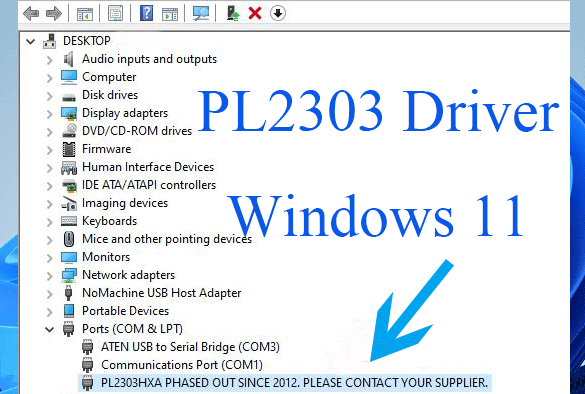
Some issues are related to the PL2303 driver in Windows 11. Some users encountered an error message saying “Please install corresponding PL2303 driver to support Windows 11 and further OS” in Device Manager. This could be due to various reasons. Here are some problems:
Driver compatibility
Incorrect driver installation
Device Manager port issue
Driver signature
Compatibility mode
Troubleshooting common Pl2023 driver issues in Windows 11
1. Install the latest USB to Serial Driver
First and foremost, you should attempt updating the outdated or missing driver. You may also disable and enable it in Device Manager. If the driver is corrupted, you can remove it and restart the computer to allow Windows to automatically install a new driver.
2. Return the USB to Serial Driver
Upgrading a driver does not always cure the problem and might introduce other problems. The PL2303 driver not functioning problem may indicate that your most recent driver upgrades are incompatible with your hardware. If this is the case, you must revert to an older driver version.
1. Start Device Manager.
2. Expand the Ports (COM & LPT) section.
3. Locate Prolific USB to Serial Comm Port, right-click it, and then choose Properties.
4. Navigate to the Driver tab in the Properties window and choose Roll Back Driver.
5. It will lead you to inquire why. Simply select one of the reasons and click Yes.
Finally, the proper driver will be installed. When it has finished successfully, just reconnect your device. It should now work.
If you were unable to roll back the current PL2303 driver, you can try updating it and manually selecting the previous version on your computer.
Error Fix for Prolific USB to Serial Driver "Code 10"
The well-known "code 10" bug is another typical PL2303 driver issue. The following error messages are possible:
Code 10 indicates that the gadget will not start. This device does not have a driver loaded. The driver could not be installed. … If you utilize non-original or counterfeit chipsets, these warnings may show. It will be disabled by the manufacturer. Simply follow the instructions below to find a solution.
Save PL2303_64bit_Installer.exe somewhere safe. Remove any and all USB to Serial adapters from your computer. To proceed, double-click PL2303_64bit_Installer.exe and follow the instructions to connect in one USB to Serial adapter. Finally, restart your computer.
We recommended downloading the PL-2303 driver. Because many people are unsure where to obtain the PL2303 driver for Windows 11
Tip:
1. If you want the older version of the PL2303 driver for some reason like coming across the above code 10 error, just replace the “402” in the download link.
2. To install the downloaded PL2303 driver, just extract the zip file, find the installer.exe file, and double-click on it. Then, just follow the on-screen steps, which are similar to installing an app.
Ending
If you are using a device that employs the PL2303 chipset and need to connect it to your computer, it's crucial to install the correct PL2303 driver for your operating system to establish a reliable and stable communication link between the device and the computer.
