
 AOMEI Partition Assistant
Windows 11 Update Error 0x80248007: A Quick Guide to Troubleshooting
Encountering errors during the update process can be frustrating, and one such error that Windows 11 users may come across is 0x80248007. In this guide, we'll explore the causes of this error and provide practical solutions to ensure a seamless update experience.

By Hedy / Updated on February 2, 2024


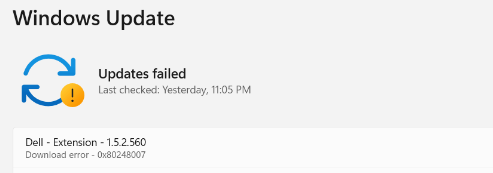
Understanding Windows 11 update error 0x80248007
Error 0x80248007 is a specific error code associated with Windows Update on Microsoft Windows operating systems. When this error occurs, it typically indicates a problem with the Windows Update service or its components. Users often encounter this error when trying to download or install updates for their Windows system.
The error code 0x80248007 may manifest during the Windows Update process, and it can prevent the successful download and installation of updates.
Common Causes of Windows 11 update download error 0x80248007
Error 0x80248007 is a Windows Update error that typically occurs when there are issues with the Windows Update service or its components. Common causes of this error include:
Network Issues:
Poor or unstable internet connection.
Firewall or antivirus software blocking the connection to the Windows Update servers.
Corrupted System Files:
System files necessary for Windows Update may be corrupted.
Proxy Settings:
Incorrect proxy settings can interfere with the communication between your system and the Windows Update servers.
Software Conflicts:
Third-party software, especially security software, may interfere with the update process.
Windows Update Service Issues:
The Windows Update service or related services may be stopped or not functioning correctly.
Insufficient Disk Space:
If your system has low disk space, it can affect the ability to download and install updates.
Troubleshooting Steps for Error 0x80248007
To address this error effectively, users can follow a series of troubleshooting steps. These include verifying internet connectivity, manually updating Windows components, and checking for potential malware or antivirus conflicts.
Step 1. Utilizing Windows Update Troubleshooter
One powerful tool at your disposal is the Windows Update Troubleshooter. Learn how to use this built-in feature to automatically diagnose and resolve update-related issues.
Step 2. Manual Update Process
For users comfortable with a more hands-on approach, this section provides step-by-step instructions on manually updating Windows 11, ensuring a smooth and error-free process.
Step 3. Checking System Requirements
To prevent future update errors, it's crucial to ensure that your device meets the system requirements for Windows 11. Addressing potential hardware limitations can significantly reduce the likelihood of encountering error 0x80248007.
Step 4. Registry Fixes for Error 0x80248007
For advanced users, this section offers guidance on editing the Windows registry to address error 0x80248007. While effective, caution and adherence to safety tips are essential due to the risks involved.
Step 5. Updating Device Drivers
Outdated drivers can contribute to update errors. Discover the importance of keeping drivers up-to-date and follow the steps to ensure a smoothly functioning system.
Step 6. Contacting Microsoft Support
If all else fails, users are encouraged to reach out to Microsoft Support for professional assistance. This section provides information on available support channels.
Conclusion
In conclusion, addressing Windows 11 update error 0x80248007 requires a strategic approach. By understanding the causes, following troubleshooting steps, and taking preventative measures, users can ensure a seamless update experience.
