
 AOMEI Partition Assistant
Fixed: After Cloning Hard Drive Dual Boot Menu is Missing
Have you ever encountered the “after cloning hard drive dual boot menu is missing”issue? In this article, you will learn the reasons for it and get simple yet powerful solutions to it.

By Hedy / Updated on June 13, 2025


Why cloning affects boot menus?
Cloning a hard drive is a common method to upgrade or replace a disk without reinstalling the operating system. However, cloning can sometimes disrupt the boot menu, especially if you have a dual-boot setup with Windows and Linux, or two versions of Windows. Here’s why:
1. Boot Configuration Data (BCD) gets misaligned
When you clone a disk, the system might not properly copy or update the bootloader, such as the Windows Boot Manager. These contain paths and references to partitions and drives, and those references may no longer be valid on the new cloned disk.
2. Disk signatures and partition UUIDs Change
Bootloaders rely on unique disk identifiers and partition GUIDs. After cloning, these identifiers can change, causing the boot menu to point to the wrong locations.
3. Incorrect boot order
After cloning, your BIOS/UEFI might boot from the wrong disk or partition. This can cause it to skip the boot menu entirely or boot into only one operating system.
How to recover the dual boot menu after cloning hard drive
If your dual-boot menu is missing or broken after cloning, don’t worry. You can usually fix it using one of the following methods:
Method 1. Repair Windows Bootloader
If Windows isn’t booting properly or it bypasses the dual boot menu, the Boot Configuration Data (BCD) may need to be rebuilt.
Step 1. Use Microsoft’s Media Creation Tool to make a bootable USB/DVD.
Step 2. Enter BIOS/UEFI and set the boot priority to the USB or DVD. Enter Repair Mode.
Step 3. On the installation screen, select “Repair your computer”. Go to Troubleshoot > Advanced options > Command Prompt.
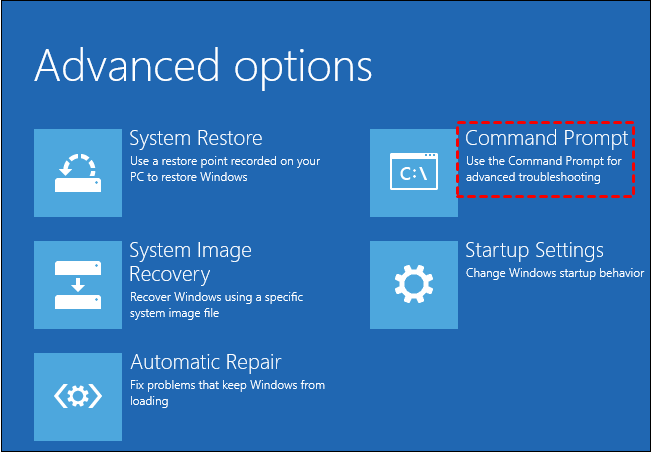
Step 4. In the Command Prompt, type the following:
bootrec /fixmbr
bootrec /fixboot
bootrec /scanos
bootrec /rebuildbcd
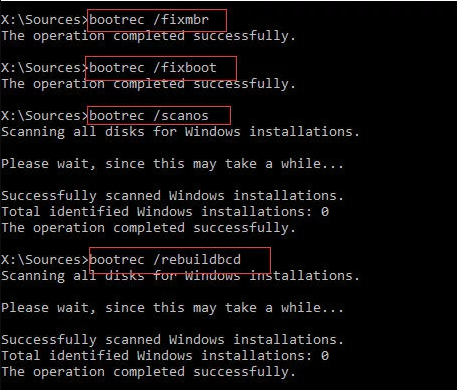
This repairs the Windows bootloader and rebuilds the boot configuration.
Step 5. Restart and Check Boot Menu. If the other OS (e.g., Linux) isn’t listed, you may need to repair its bootloader (GRUB).
Method 2. Use boot repair tools
If you've set up a dual-boot system—say, Windows 10 alongside Windows 11—but suddenly the boot menu no longer appears after cloning hard drive, don’t worry. This issue is often caused by problems with the Boot Configuration Data, such as missing BCD or corruption during updates, partition changes, or third-party bootloader interference.
One effective solution is using AOMEI Partition Assistant, a powerful disk management tool that comes with built-in features to repair boot issues and rebuild the BCD file without requiring complex command-line inputs.
Step 1. Install AOMEI Partition Assistant on a working PC and connect a USB drive with enough storage to this PC.
Step 2. Open this software and select the Boot Repair tool below the Recover section.

Step 3. Click the create a bootable disk option to create a WinPE Boot Repair USB drive.

Step 4. Plug the created drive into the non-booting computer, then enter the BIOS settings to change the boot order so that the computer boots from it. It will automatically load the Boot Repair tool and perform a scan of boot entries.

Step 5. Once the process completes, you will see all scan results, including system paths, system versions, and boot status. Select the repairable boot entries you want to repair and click the Repair button.
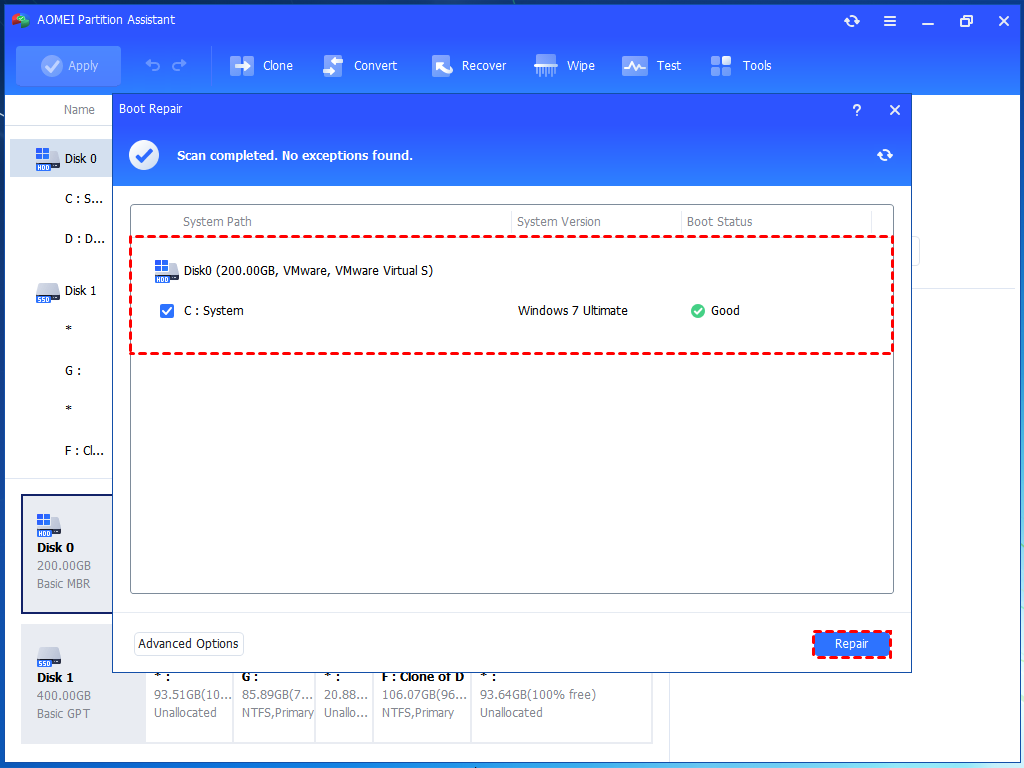
Step 6. Wait for the repair process to finish, then remove the bootable USB drive and boot the PC from the original system drive.

FAQs
1. Can I recover dual boot without reinstalling OS?
Yes! In most cases, repairing the bootloader or using tools like EasyBCD or GRUB fixes it without reinstalling.
2. What’s the safest way to clone a dual boot setup?
Use a tool that supports sector-by-sector cloning and includes EFI/boot partitions, like AOMEI Partition Assistant.
3. Can I use AOMEI Partition Assistant to fix boot issues?
Yes. Its Boot Repair and Rebuild MBR features are perfect for this kind of recovery.
4. Why did my cloned drive not boot at all?
Possible reasons include missing bootloader, incorrect BIOS/UEFI settings, or incomplete clone. Rebuild the MBR or use startup repair.
Conclusion
Cloning a hard drive can disrupt the boot menu due to changes in disk signatures, partition GUIDs, or BCD misalignment. This is especially common in dual-boot systems. Fortunately, you can recover the boot menu using tools like AOMEI Partition Assistant or by manually repairing the Windows bootloader with bootrec commands. These methods can restore your system without reinstalling the OS.
