PartitionAssistant NTFS for Mac
SYSGeeker NTFS for Mac: Overview & Alternative
Are you searching for SYSGeeker NTFS for Mac to gain full read and write access to NTFS‑formatted drives on a Mac? If so, this guide will provide the information you need and introduce a reliable alternative tool to help you manage NTFS drives on macOS.

By Hedy / Updated on March 16, 2026


Many users search for free ways to unlock full read-and-write access to NTFS drives on macOS. Instead of purchasing licensed software, they often browse the internet for cracked versions, serial keys, or key generators for tools such as Paragon NTFS for Mac, NTFS-3G, Tuxera NTFS for Mac, SYSGeeker NTFS for Mac, and similar utilities.
At first glance, a cracked version may seem appealing. It promises the same functionality—enabling file editing, copying, and management on NTFS drives—without any cost. However, relying on unauthorized software raises important concerns that should not be overlooked.
This guide focuses on SYSGeeker NTFS for Mac and examines whether using a cracked version is a safe or practical choice. It also explores reliable alternatives that allow seamless access to Windows NTFS drives on macOS, making it easier to read, write, and manage files without compromising stability or security.
Overview of SYSGeeker NTFS for Mac
SYSGeeker is a utility designed to provide full access to Windows NTFS-formatted drives on macOS. With this tool, users can mount NTFS disks and gain both reading and writing capabilities directly from a Mac. However, because the software is proprietary, a paid subscription is required to unlock its full functionality. Users must choose between a monthly plan, an annual plan, or a lifetime license before performing tasks such as copying, sharing, transferring, creating, or modifying files on an NTFS drive from macOS.
In addition to its core features, the SYSGeeker team provides technical support to assist users who encounter issues during use. This support helps ensure the software operates smoothly and remains stable when managing NTFS drives on a Mac system.
Is it safe and good to use SYSGeeker NTFS for Mac full crack?
When evaluating the safety and practicality of using a cracked version of SYSGeeker NTFS for Mac, several important issues should be considered. Each factor highlights potential risks that may affect both system stability and data security.
1. Security risks
Cracked software often comes from unofficial sources and may contain harmful drivers, bundled packages, malware, or viruses. Installing such versions can expose a Mac and the connected NTFS drive to serious threats, including system crashes, unauthorized access, or data leaks.
2. No technical assistance
Unlike the official version, cracked software does not provide access to professional technical support. If errors occur during installation or daily use, users must troubleshoot the problems on their own without reliable help.
3. Compatibility problems with macOS updates
Apple releases new macOS versions regularly. Unofficial or cracked releases rarely keep pace with these updates, which can lead to compatibility issues, unstable performance, or complete failure after a system upgrade.
Considering these points, relying on a cracked edition of SYSGeeker NTFS for Mac is not a wise choice. A more reliable solution is to use a trusted NTFS for Mac alternative that enables seamless reading and writing on NTFS drives from a Mac, similar to the experience on a Windows computer.
The best alternative to SYSGeeker NTFS for Mac
A reliable alternative worth considering is PartitionAssistant NTFS for Mac, a powerful tool designed to provide seamless access to NTFS drives on macOS. This software allows Mac users to mount Windows NTFS drives with full read-and-write permissions automatically. It works smoothly across a wide range of Apple devices, including MacBook, MacBook Pro, MacBook Air, iMac, Mac mini, Mac Pro, and Mac Studio.
PartitionAssistant NTFS for Mac serves as a comprehensive NTFS management solution, enabling users to easily access, edit, copy, and transfer files between macOS and NTFS-formatted storage devices. The software supports numerous macOS versions, including macOS 26 Tahoe, macOS 15 Sequoia, macOS 14 Sonoma, macOS 13 Ventura, macOS 12 Monterey, macOS 11 Big Sur, macOS 10.15 Catalina, macOS 10.14 Mojave, and macOS 10.13 High Sierra.
With this tool, NTFS drives can be opened, mounted, unmounted, repaired, formatted, or safely ejected directly from a Mac system, making cross-platform file management far more convenient. The following section explains how to use PartitionAssistantNTFS for Mac to manage Microsoft NTFS drives effectively on macOS.
Step 1. You can install and run PartitionAssistant NTFS for Mac and connect your NTFS device.
Step 2. Your connected, removable, and external drives will be mounted and listed.
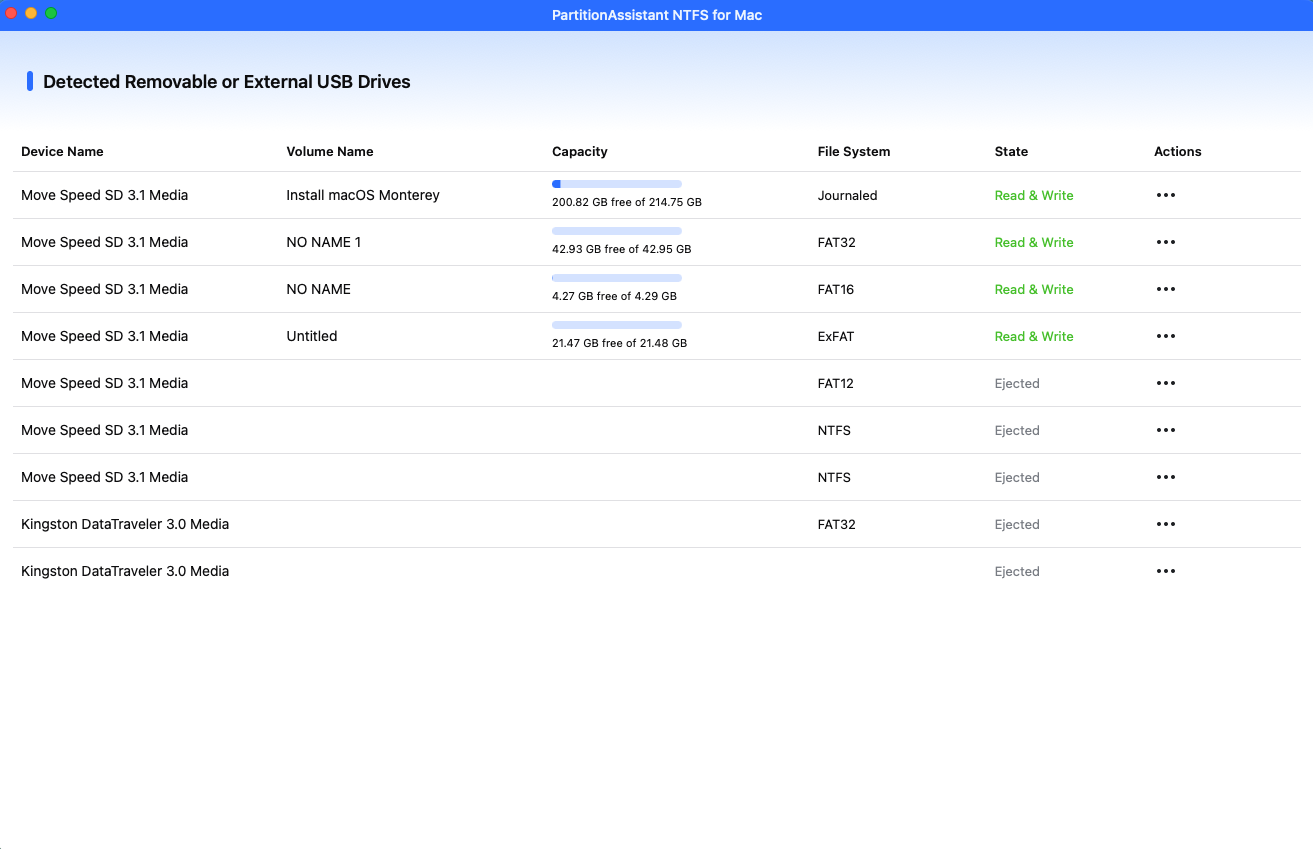
Step 3. Select the drive you want to operate and click "Open". Then you use all your NTFS drive on your Mac.
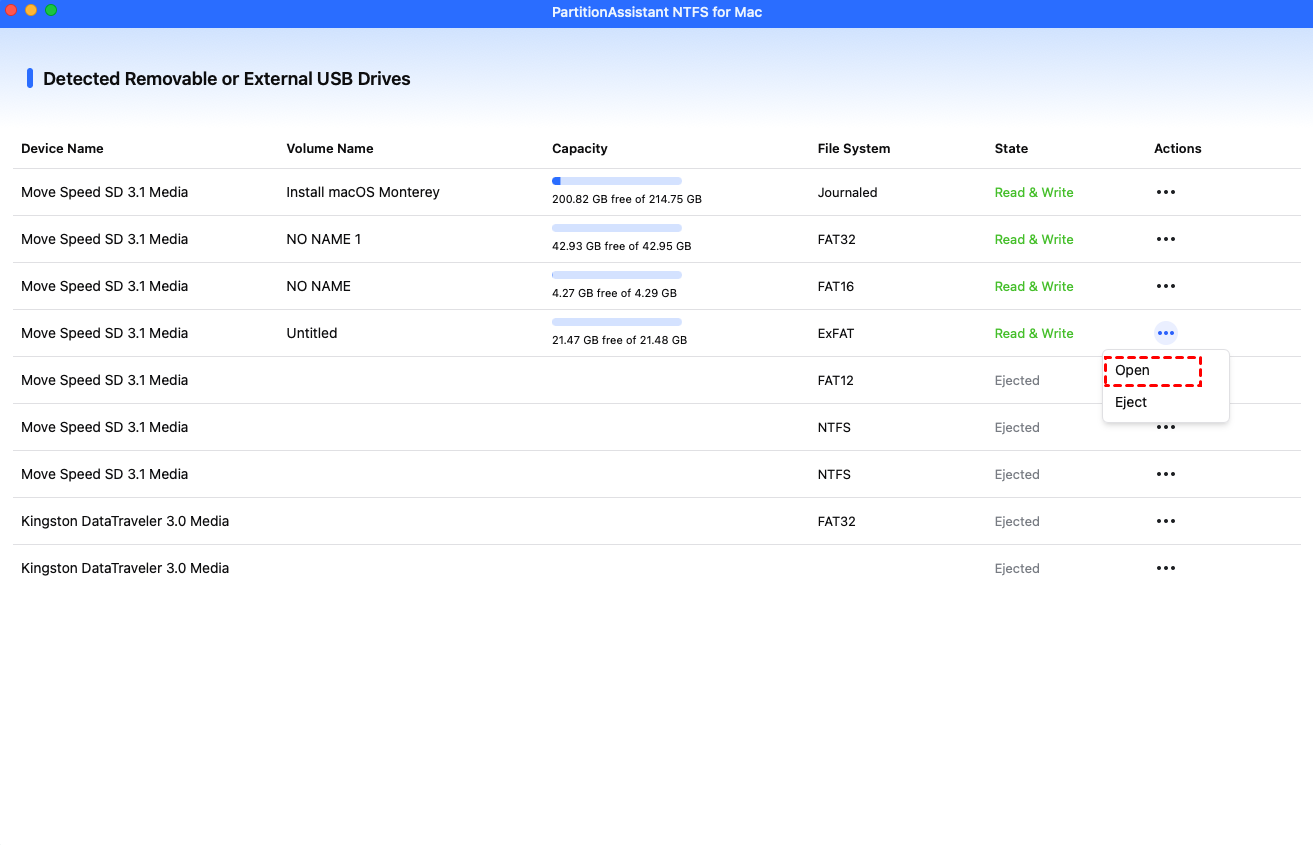
After all operations are complete, please click "Eject" to disconnect the external hard drive from your Mac.
FAQs
💡 Can macOS write to NTFS drives without software?
No. macOS can read NTFS drives but cannot write to them natively. To enable write access, you need third-party software or drivers designed to mount NTFS volumes in read-write mode.
💡 Is SYSGeeker NTFS for Mac free?
SYSGeeker NTFS for Mac is not completely free. It usually offers a free trial with limited functionality, but full NTFS read-write support requires purchasing a license.
💡 Does SYSGeeker NTFS for Mac work with Apple Silicon Macs?
Yes. SYSGeeker NTFS for Mac supports both Intel-based Macs and Apple Silicon models (such as M1, M2, and newer chips) running modern versions of macOS.
💡 Do I need to reformat my NTFS drive to use it on Mac?
No. You don’t need to reformat the drive. Installing NTFS driver software allows macOS to read and write to NTFS drives without erasing or changing the existing file system.
💡 Is NTFS better than exFAT for external drives?
NTFS is generally more reliable and supports permissions, encryption, and journaling. However, exFAT offers better cross-platform compatibility between macOS and Windows without requiring additional software.
Conclusion
Using a cracked version of SYSGeeker NTFS for Mac may seem like a convenient way to gain NTFS write support without paying, but it introduces significant security, stability, and compatibility risks. Instead of relying on unsafe software, choosing a trusted solution such as PartitionAssistant NTFS for Mac ensures reliable NTFS read-write access, regular updates, and proper technical support, allowing Mac users to manage NTFS drives safely and efficiently without compromising their system or data.